- Android
- iOS
- JavaScript
- Flutter
- ReactNative
A message reaction is a response to a message using an emoji or special symbol, such as like or wry smile.
Message reaction callbacks are included in the message listener.
JIM.getInstance().getMessageManager().addListener("main", new IMessageManager.IMessageListener() {
    /// callback triggered when a message reaction is added
    /// conversation: containing conversation
    /// reaction: added message reaction
    @Override
    public void onMessageReactionAdd(Conversation conversation, MessageReaction reaction) {

    }

    /// callback triggered when a message reaction is removed
    /// conversation: containing conversation
    /// reaction: removed message reaction
    void onMessageReactionRemove(Conversation conversation, MessageReaction reaction) {

    }
});
A message reaction is a response to a message using an emoji or special symbol, such as like or wry smile.
Message reaction callbacks are included in the message listener.
[JIM.shared.messageManager addDelegate:self];

/// callback triggered when a message reaction is added
/// - Parameter reaction: added message reaction
/// - Parameter conversation: containing conversation
- (void)messageReactionDidAdd:(JMessageReaction *)reaction
               inConversation:(JConversation *)conversation {

}

/// callback triggered when a message reaction is removed
/// - Parameter reaction: removed message reaction
/// - Parameter conversation: containing conversation
- (void)messageReactionDidRemove:(JMessageReaction *)reaction
                  inConversation:(JConversation *)conversation {

}
A message reaction is a response to a message using an emoji or special symbol, such as like or wry smile. After a reaction is added, the message automatically includes the reactions property, which contains reactions from all users.
Use the reactions property to render the UI, as shown below.
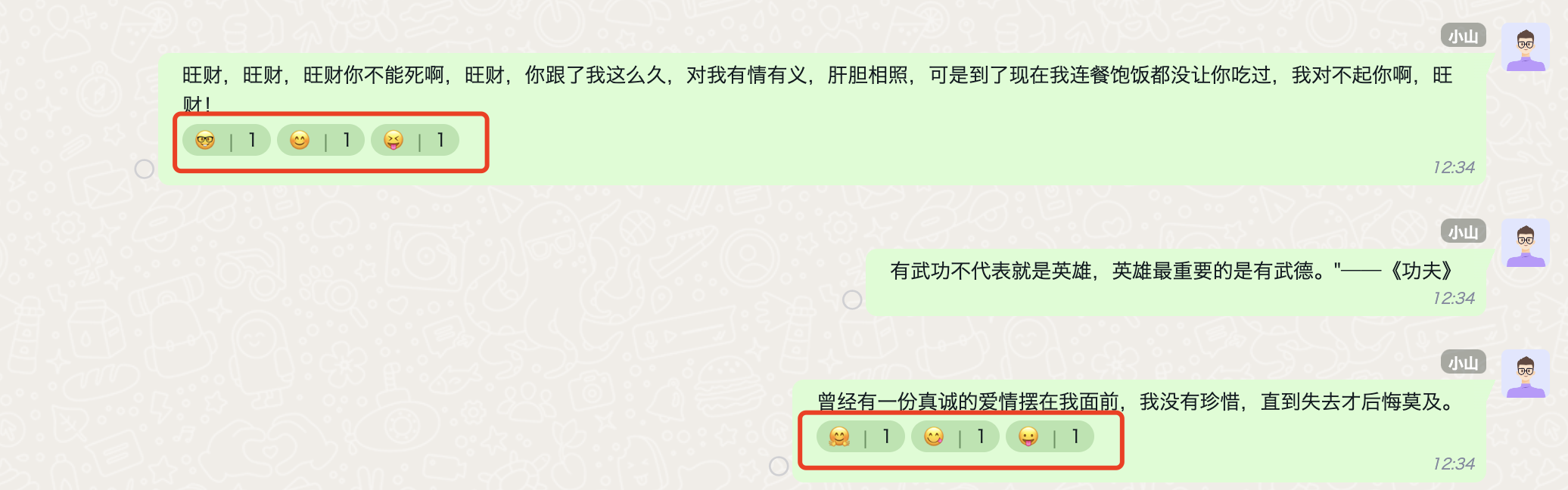
Message reactions can be obtained from two sources: message history and message reaction events. The differences are as follows:
Message history: Retrieves the complete latest list of message reactions. The cloud updates and maintains it automatically while users are offline.
Reaction events: Incremental changes are synchronized while users are online. Adding or removing a reaction triggers an event, but adding or removing your own reaction does
not triggera reaction event.
Code Example
let { Event } = JIM;

// Register this only once globally, alongside the message listener. It is shown here for readability.

jim.on(Event.MESSAGE_REACTION_CHANGED, (notify) => {
  /*
    Processing logic: Developers only need to update in-memory message reactions. The cloud and local SDK update automatically, and retrieving message history again returns the latest reaction data.
    notify example:
      {
        conversationId: "qEqA0i9C2pg"
        conversationType: 2
        messageId: "nxe3swhgabukvd8k",
        reactions: [
          {
            isRemove: false,
            //key used for additions or removals
            key: ':simle',
            value: 'user ID',
            timestamp: 1740177311973
            user: {
              id: 'user ID',
              name: 'display name',
              portrait: 'avatar'
            }
          }
        ]
      }
    */
  console.log(notify);
});
A message reaction is a response to a message using an emoji or special symbol, such as like or wry smile.
Message reaction callbacks are included in the message listener.
/// callback triggered when a message reaction is added
/// conversation: containing conversation
/// reaction: added message reaction
JuggleIm.instance.onMessageReactionAdd = (conversation, reaction) {

};
/// callback triggered when a message reaction is removed
/// conversation: containing conversation
/// reaction: removed message reaction
JuggleIm.instance.onMessageReactionRemove = (conversation, reaction) {

};