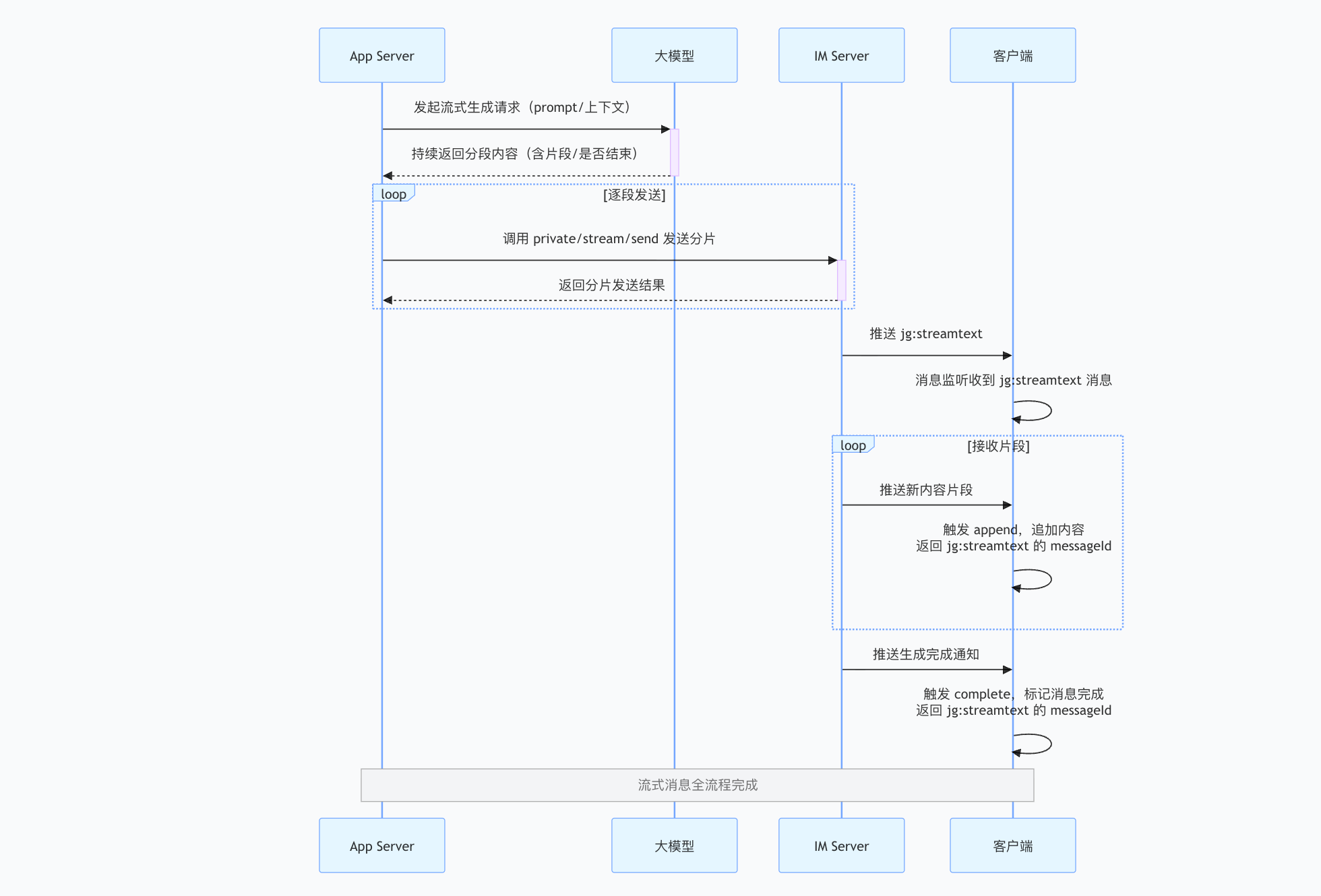
App Serverrequests generated content from a large language model:App Serversends a streaming generation request with the prompt and context. The model continuously returns content segments, each containing content and a completion indicator.
App Serversends segments: Based on the model output,App Servercalls theIM ServerSendStream API to send each segment toIM Server. Each call returns the segment delivery result.
- IM pushes the initial message: when
App Servercalls SendStream withseq = 1andis_finished = false,IM Serverpushes ajg:streamtextmessage to clients. The client receives this streaming message through the message listener.
- The client receives and appends segments:
IM Servercontinuously pushes new content segments to clients. Each segment triggers anappendevent, which appends the content to the message and returns themessageIdofjg:streamtext.
- Completion notification: After generation finishes,
App Servercalls SendStream withseqset to the last segment number andis_finished = true.IM Serverpushes a completion notification to clients, triggering thecompleteevent.
1. Reconnection after a network outage: The SDK automatically delivers complete notifications for new segments missed during the outage to the application layer.
2. Process termination or browser closure after generation starts: When users return online, they can still receive complete generated content or segments still being generated.
3. Automatic synchronization of generated content across devices: For example, content generated by user A on iOS remains visible after signing in on Web; in-progress content supports synchronized updates.
4. Generated-content timeout: After App Server begins sending a streaming message, it is completed automatically if is_finished = true is not set within 10 minutes. Content may be incomplete.
5. Retrieving message history: Generated messages can be retrieved directly through the message history APIs on each client. Their content is already assembled completely, and the application can render them by message type.
- Android
- iOS
- JavaScript
- ReactNative
JIM.getInstance().getMessageManager().addListener("main", new IMessageManager.IMessageListener() {
    /// message-receive callback
    @Override
    public void onMessageReceive(Message message) {
        MessageContent content = message.getContent();
        if (content instanceof StreamTextMessage) {
            Log.d("TAG", "stream message did receive, content is " + ((StreamTextMessage) content).getContent());
        }
    }
}

JIM.getInstance().getMessageManager().addStreamMessageListener("main", new IMessageManager.IStreamMessageListener() {
    @Override
    public void onStreamTextMessageAppend(String messageId, String content) {
        // messageId: ID of the corresponding streaming message
        // content: content appended by this chunk; append content to the end of StreamTextMessage.content in the UI
    }

    @Override
    public void onStreamTextMessageComplete(Message message) {
        // message: complete streaming-message object
    }
});
// message-receive delegate
[JIM.shared.messageManager addDelegate:self];
//streaming-message delegate
[JIM.shared.messageManager addStreamMessageDelegate:self];

#pragma mark - JMessageDelegate
/// message-receive callback
- (void)messageDidReceive:(JMessage *)message {
    JMessageContent *content = message.content;
    if ([content isKindOfClass:[JStreamTextMessage class]]) {
        NSLog(@"stream message did receive, content is %@", ((JStreamTextMessage *)content).content);
    }
}

#pragma mark - JStreamMessageDelegate
- (void)streamTextMessageDidAppend:(NSString *)messageId content:(NSString *)content {
    // messageId: ID of the corresponding streaming message
    // content: content appended by this chunk; append content to the end of JStreamTextMessage.content in the UI
}

- (void)streamTextMessageDidComplete:(JMessage *)message {
    // message: complete streaming-message object
}
let { Event, MessageType } = JIM;

// Register this only once globally, alongside the message listener. It is shown here for readability.

jim.on(Event.MESSAGE_RECEIVED, (message) => {
  if(message.name == MessageType.STREAM_TEXT){
    console.log('Received a streaming message', message)
  }
  //... other message types
});

jim.on(Event.STREAM_APPENDED, (notify) => {
  // notify => { content: 'new content chunk', messageId: 'messageId of MessageType.STREAM_TEXT' }
  console.log('Event.STREAM_APPENDED', notify)
});

jim.on(Event.STREAM_COMPLETED, (notify) => {
  // notify => { content: 'complete generated content', messageId: 'MessageType.STREAM_TEXT' }
  console.log('Event.STREAM_COMPLETED', notify)
});
Streaming messages are intended for AI assistants and similar scenarios, and support real-time streamed text output. To implement a typing effect, place
StreamTextMessageContentmessages in a queue. After enqueueing, append content continuously throughappendand dequeue it character by character to create the typing effect.
- When a received message is an unfinished
jg:streamtextstreaming message - Subsequent streaming messages trigger
onStreamTextMessageAppendappend notifications - Completion triggers
onStreamTextMessageComplete
// message-receive listener
JuggleIM.addMessageListener('MessageListScreen', {
      onMessageReceive: (message: Message) => {
}})


/**
 * streaming-message listener
 * Listens for streaming-message append and completion events
 */
const unsubscribe = JuggleIM.addStreamMessageListener('stream_listener_key', {
  /**
   * callback triggered when a streaming-message chunk is appended
   * @param {string} messageId - streaming-message ID
   * @param {string} content - content appended by this chunk; append content to the end of StreamTextMessage.content in the UI
   */
  onStreamTextMessageAppend: (messageId, content) => {
    console.log('Stream message append:', messageId, content);
    // Append content in the UI to create a typewriter effect
  },

  /**
   * callback triggered when a streaming message is complete
   * @param {Message} message - completed streaming message
   */
  onStreamTextMessageComplete: (message) => {
    console.log('Stream message complete:', message);
    // Update the UI to display the complete message
  }
});

// remove the listener
// unsubscribe();

/**
 * streaming-text message content: jg:streamtext
 * Streaming messages are used for AI assistants and similar scenarios; content is appended in chunks
 * @property {string} content - message content
 * @property {boolean} isFinished - whether complete
 * @property {number} seq - streaming-message sequence number
 */
export class StreamTextMessageContent extends MessageContent {
    contentType: string;
    content: string;
    isFinished: boolean;
    seq: number;
}