WebSocket Long Connections: Engineering Practice for Low-Throughput, High-Efficiency Communication
Introduction
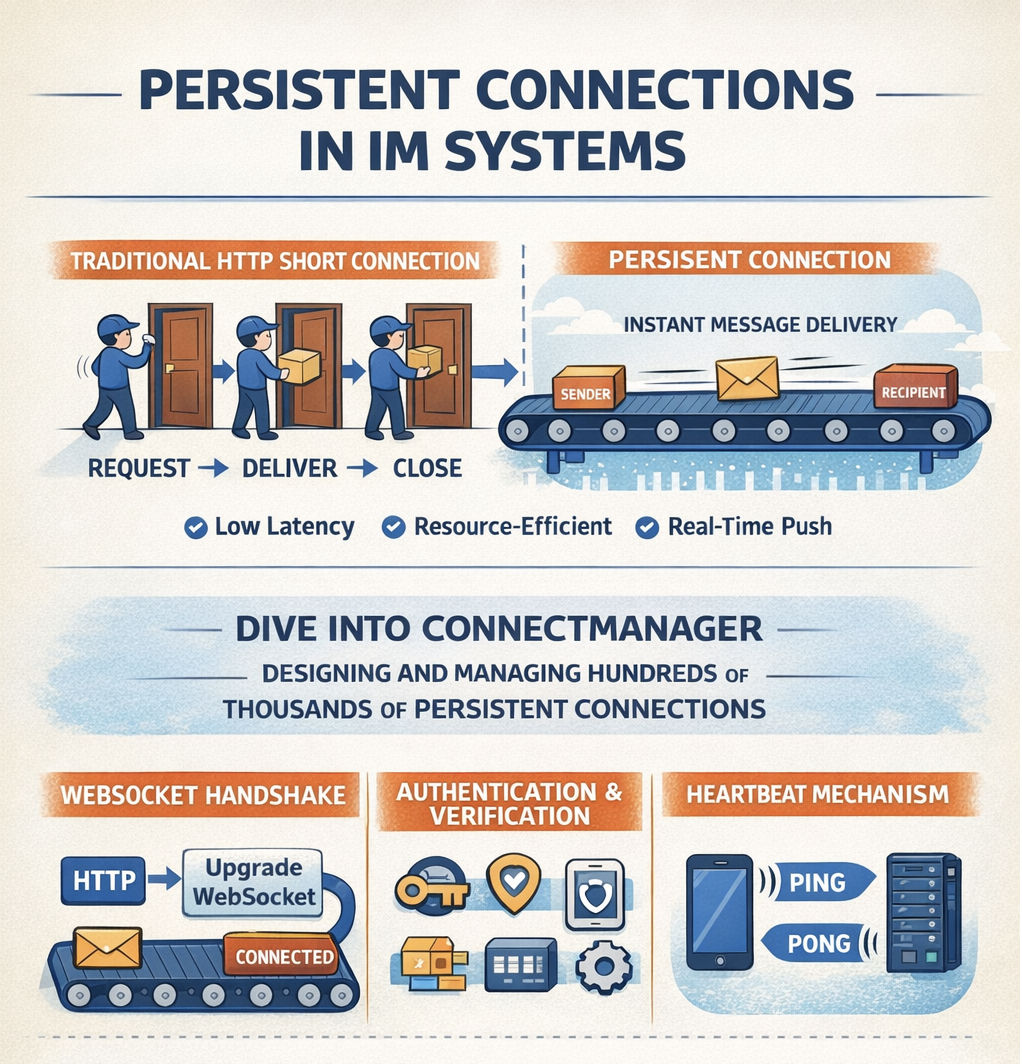
If you compare an IM system to a logistics network, then the long connection is the permanent express lane between the sender and the receiver. Unlike traditional HTTP requests, where every call has to "knock — open the door — deliver — close the door", a long connection is like a conveyor belt between sender and receiver that never closes, so messages can be delivered instantly.
Today, we dive into JuggleIM's ConnectManager (connection manager) and see how a high-performance IM system designs and manages hundreds of thousands of long connections.
1. Why IM Needs Long Connections
Before diving into the technical details, let's understand why IM systems can't live without long connections.
The Predicament of HTTP Short Connections
Traditional web applications use HTTP short connections, in this pattern:
- The client initiates a request
- The server returns a response
- The connection is closed
This pattern has a fatal flaw: the server cannot actively push messages to the client.
If you try to implement IM with short connections, you can only use polling:
- The client asks the server every few seconds: "Are there any new messages for me?"
- 99% of the requests get the answer: "No."
The drawbacks of this approach are obvious:
- High latency: New messages may not arrive until the next poll.
- Wasted resources: Vast numbers of invalid requests consume server and network resources.
- Drains battery and data: The mobile device's battery and data are consumed by useless polling.
The Advantages of Long Connections
Once a long connection is established, the channel between client and server stays open. When there are new messages:
- The server can immediately push them to the client
- No polling required from the client
- Latency can reach the millisecond level
In terms of protocol choice, JuggleIM chose WebSocket. Compared to a raw TCP socket, WebSocket has several advantages:
- HTTP compatibility: The handshake uses HTTP, making it easy to traverse firewalls and proxies.
- Cross-platform: Browsers, mobile, and desktop all have solid support.
- Lightweight: The data-frame format is simple and efficient.
2. The Complete Flow of Connection Establishment
Let's trace the full process from a client opening the app to successfully establishing a connection.
Step 1: WebSocket Handshake
The client sends a WebSocket connection request to the server. At the HTTP layer, this is a special GET request carrying the Upgrade: websocket header.
The server receives the request, completes the protocol upgrade, and the WebSocket channel is established. At this point, both sides can start bidirectional communication.
Step 2: Application-Layer Connection
The WebSocket being established is just transport-layer preparation; the application layer still needs to complete authentication and initialization.
The client sends a Connect message, containing:
- AppKey: application identifier
- Token: user authentication token
- Platform: client platform (iOS / Android / Web)
- DeviceId: device identifier
- SdkVersion: SDK version
- PushToken: push token (used for offline push)
Step 3: Server-Side Verification
When the server receives the Connect message, it performs a series of validations:
Checkpoint 1: Application Validation
- Verify the AppKey exists
- Check whether the application status is normal
Checkpoint 2: Token Validation
- Parse the Token to obtain user information
- Verify the Token signature is valid
- Check whether the Token has expired
Checkpoint 3: User Validation
- Check whether the user is banned
- Check whether the device is banned
- Check whether the IP is banned
If any check fails, the server returns the corresponding error code, and the client must handle the error (e.g. re-fetch the Token).
Step 4: Connection Initialization
After validation passes, the server completes connection initialization:
- Generate a Session: Assign a unique Session ID to this connection
- Set up context: Store AppKey, UserId, Platform, and other info in the connection context
- Join the connection pool: Add the connection to the in-memory connection manager
- Register the push token: If a PushToken was provided, register it with the push service
- Trigger the online event: Notify related services that the user is online
Step 5: Return Confirmation
The server returns a ConnectAck message to the client, containing:
- Code: result code, 0 means success
- UserId: user ID
- Session: session identifier
- Timestamp: server timestamp
At this point, a complete authenticated long connection has been established. Subsequent message send/receive operations all go through this connection.
3. Heartbeat Keep-Alive Mechanism
Once a long connection is established, how do we keep it "alive"? That's where the heartbeat mechanism comes in.
Why We Need Heartbeats
Long connections face several problems:
- Unstable networks: Mobile networks can drop at any time
- NAT timeout: Network devices will clean up long-idle connections
- User inactivity: The user might put the app in the background for a long time
Without a heartbeat mechanism, the server cannot tell whether a connection is still valid, which can lead to:
- The server keeping a large number of "zombie connections" and wasting resources
- Genuinely disconnected users not receiving messages, without knowing they need to reconnect
JuggleIM's Heartbeat Design
JuggleIM uses a bidirectional heartbeat mechanism:
Client Heartbeat:
- The client periodically (usually every 30–60 seconds) sends a Ping message
- The server immediately returns a Pong message upon receipt
- The client, on receiving Pong, confirms the connection is healthy
Server-Side Detection:
- The server records each connection's last-active time
- A timer fires every 5 seconds to check
- If a connection has been inactive for more than 5 minutes, it is considered timed out and the server actively disconnects
- On disconnect, the offline event is triggered and related resources are cleaned up
Heartbeat Interval Trade-offs
Setting the heartbeat interval is a balancing act:
- Too short: Frequent heartbeats consume network and battery
- Too long: Disconnection detection is delayed, hurting user experience
JuggleIM's design gives the server a 5-minute timeout, leaving the client plenty of flexibility. Clients can dynamically adjust the heartbeat interval based on network conditions:
- WiFi: every 60 seconds
- Mobile network: every 30 seconds
- Background: can be longer
4. Traffic Control: Preventing Malicious Spam
IM systems need to prevent users from sending high-frequency messages maliciously. This could be an attack, or it could just spam and disturb other users. JuggleIM implements traffic control at the connection layer.
Token Bucket Algorithm
JuggleIM uses the token bucket algorithm for rate limiting:
Basic principle:
- Each connection has a token bucket
- Tokens are added to the bucket at a fixed rate (e.g. 100 per second)
- The bucket has a capacity upper limit (e.g. 10)
- Each message send consumes one token
- If the bucket is empty, the request is rejected
Configuration parameters:
- Rate: 100 tokens per second
- Bucket capacity: 10 tokens
This means:
- During normal use, tokens are plentiful and messages go through normally
- During sudden high-frequency sending, the bucket's tokens are quickly used up
- Once exhausted, at most 100 messages can be sent per second
Handling Excess
When a user exceeds the rate limit, the server returns a rate-limit error code. The client should:
- Pause sending and wait a short while
- Show the user a "Sending too frequently, please try again later" message
5. Multi-Device Connection Management
Modern IM all support users being logged in on multiple devices simultaneously. How does JuggleIM manage multiple connections for the same user?
Connection Identification System
Each connection has three layers of identification:
- Session: globally unique connection identifier
- UserId: user identifier
- DeviceId: device identifier
This design supports:
- The same user on different devices gets different Sessions
- All active connections can be queried by user
- Messages can be sent to a specific device
Multi-Device Message Sync
When a user has multiple devices online, how are messages distributed?
When sending a message:
- The message is pushed to all online devices of the recipient
- The message is also pushed to the sender's other devices (outbox sync)
Ensuring consistency:
- Use a sync-timestamp mechanism
- Each device maintains its own sync point
- When switching devices, start pulling from that sync point
Kick-Out Mechanism
Some scenarios require limiting the number of devices online at the same time. JuggleIM supports a kick-out feature:
- When a new device logs in, you can choose to kick out the old device
- The kicked-out device receives a specific error code
- The client can prompt the user: "Your account is logged in on another device"
6. Connection Exception Handling
The network environment is complex and changeable; connections can go wrong at any time. JuggleIM handles all kinds of exceptions thoroughly.
Exception Type Classification
- Network errors: physical network interruption, DNS resolution failure, etc.
- Protocol errors: message format error, protocol version incompatibility, etc.
- Business errors: Token expired, user banned, etc.
- Timeout errors: heartbeat timeout, response timeout, etc.
Disconnect Flow
Regardless of the cause, the following cleanup flow is performed on disconnect:
- Close the connection: close the WebSocket channel
- Trigger offline: notify related services the user is offline
- Clean up cache: remove the connection from the connection manager
- Log it: record the disconnect reason to help with troubleshooting
Client Reconnection Strategy
After a disconnect, the client needs to reconnect automatically. A reasonable reconnection strategy:
Exponential backoff:
- 1st reconnect: immediately
- 2nd reconnect: 1 second later
- 3rd reconnect: 2 seconds later
- 4th reconnect: 4 seconds later
- ...
- Upper bound: e.g. 30 seconds
Jitter:
- Add a random factor to the backoff time
- Avoid large numbers of clients reconnecting at the same instant and crushing the server
Reconnect cap:
- After a certain number of consecutive failures, stop auto-reconnecting
- Prompt the user to check their network
7. Performance Optimization at the Connection Layer
Under high concurrency, the connection manager is under enormous pressure. JuggleIM does multi-faceted performance optimization.
Data Structure Optimization
Connections are stored in efficient concurrent data structures:
- The connection pool uses a sharded Map to reduce lock contention
- The user-connection index uses read-write locks, optimizing read performance
Goroutine Model
Go's goroutines are very lightweight, and JuggleIM makes full use of this:
- Each connection has an independent read goroutine, responsible for receiving messages
- Writes are protected by the connection's own lock
- Timed tasks use a dedicated goroutine pool
Memory Optimization
In a long-connection scenario, memory management is important:
- Read/write buffer reuse, reducing memory allocation
- Connection context uses
sync.Mapto avoid large locks - Periodically clean up invalid data, preventing memory leaks
8. Security Hardening
The connection layer is the system's entry point, so security protections are essential.
Transport Encryption
JuggleIM supports WSS (WebSocket Secure), based on TLS-encrypted transport. All data is encrypted in transit, preventing man-in-the-middle attacks.
Application-Layer Encryption
In addition to transport-layer encryption, JuggleIM also supports application-layer message encryption:
- Encryption keys are negotiated when the connection is established
- Message contents use symmetric encryption
- Even the server cannot decrypt the message content
Protection Measures
- Rate limiting: token-bucket algorithm limits request frequency
- Blacklist: supports banning malicious IPs and devices
- Origin verification: validate the request's Referer / Origin
Together, these designs ensure that JuggleIM can stably support hundreds of thousands of concurrent connections.
Project URL: https://github.com/juggleim/im-server