What is IM Instant Messaging? Let's Start with the 'Message'
Many people, when first encountering IM (Instant Messaging), have an intuitive understanding:
"Isn't IM just sending a message from A to B?"
This understanding isn't wrong, but it's far from enough. A real IM system doesn't just solve "can the message be sent" — it solves a whole set of questions:
- How is a message delivered in real time when the recipient is online?
- How is a message not lost when the recipient is offline?
- When the user comes back online, how are messages delivered without duplicates, drops, or disorder?
- In a group chat, with thousands online or offline at the same time, how is message consistency maintained?
To understand these problems, we must start with the core object of IM — the message.
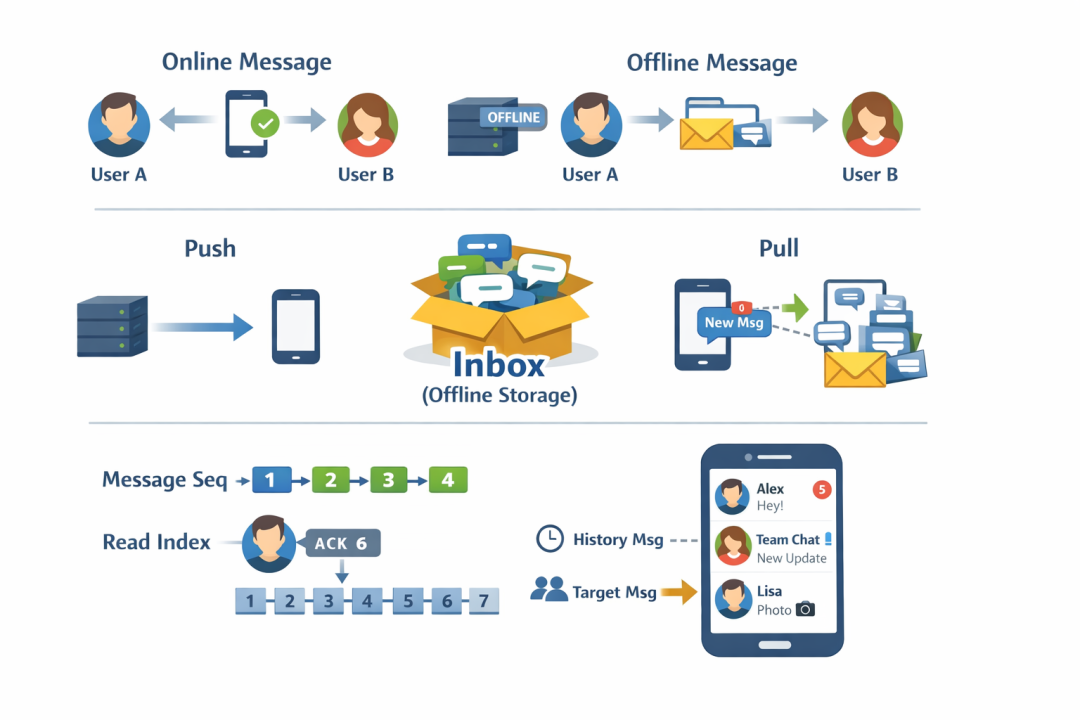
1. Online vs. Offline Messages: The First Divide in IM
In IM, whether a message can be delivered online directly determines the complexity of the entire system architecture.
1. Online Message
An online message is:
When the client is online, the server delivers the message to the client in real time via an existing connection.
Typical characteristics:
- Low latency (typically millisecond-level)
- Relies on long connections
- In most cases, delivered by direct push
So when you see "the other party is typing..." in a chat window, or a message arrives in nearly a second, that's basically direct message push at work.
2. Offline Message
In reality, users can't be online 24/7. When the client is offline, the message doesn't just "vanish" — instead:
- The server temporarily stores it
- After the client comes back online, the messages are delivered in batches
These are offline messages.
The existence of offline messages means the IM system must have:
- Storage capability
- Message backfill capability
- State coordination between client and server
2. Direct Push vs. Notify & Pull: Two Different Design Philosophies
Many people think:
"IM is just the server pushing messages to the client."
But in real systems, there are actually two modes.
1. Push Message
Direct push means:
The server pushes the complete message to the client through the long connection.
The advantages are obvious:
- Low latency
- Strong real-time capability
- Simple client logic
But the disadvantages are equally obvious:
- Extremely high demand on long-connection stability
- Weak networks, background switching, network jitter all affect success rate
2. Notify & Pull
The counterpart to direct push is the notify-and-pull mode:
- The server only pushes a "new message" notification
- The client, based on its own local message offset,
- Actively pulls incremental messages from the server
This mode is usually paired with a very important concept: the inbox.
3. Inbox: The Server-Side "Offline Cache"
The inbox, also known as a mailbox, is an extremely critical but often overlooked structure in IM systems.
You can think of it as:
The server's per-user "offline message cache."
When a user is offline:
- New messages are written to that user's inbox
- They are not delivered to the client immediately
When the user comes online:
- The client, based on its local progress,
- Incrementally syncs messages from the inbox
This is exactly what makes "notify & pull" possible.
4. Conversation List: The "First Screen" You See When Opening IM
Whether it's WeChat, QQ, or Slack, the first screen you see when opening IM is almost always:
The conversation list (sessionList / chatList)
It's not just simple UI; it's a highly condensed state set, typically containing:
- The last message in the conversation
- The number of unread messages
- Pin status
- Do-not-disturb status
Computing all of this depends on two very important index concepts.
5. Message Seq and ReadIndex: The "Sense of Order" in IM
1. Message Seq (Sequence)
Message Seq is:
A monotonically increasing message sequence number within the same conversation.
Its core role is to:
- Help the client detect message loss
- Quickly find "gaps" and trigger backfill
Without Seq, the client can only "guess."
2. Message ReadIndex (Read Index)
ReadIndex is:
A per-user "read position marker", only effective for received messages.
Its characteristics:
- Different for every user (in the same conversation, different users have different values)
- Used to quickly calculate unread count
- The basis for the unread badge in the conversation list
6. Historical Messages and Directed Messages: Complexity at Scale
Once a message is sent successfully, it becomes a historical message and needs to be stored long-term.
In group chat, to save space:
- Group messages are stored only once per group
- Users access them via indices
Going further, there's an even more complex form: directed messages.
Directed messages: in group scenarios, messages delivered to only some members.
Such messages directly challenge:
- Storage model
- Delivery model
- Permissions and visibility design
Conclusion
By now you'll see: IM is never as simple as "sending a message."
It is a precisely designed systems engineering effort, centered on:
- Online / offline
- Push / pull
- Sequence / read
- Single user / group
Everything you need is in JuggleIM.